Why your virtual machine might be unlicensed
These days, the vast majority of people running SQL Server are doing so in a virtual machine (VM). You may find on reading it, that Microsoft’s latest guidance on SQL Server virtual licensing challenges much of the current belief on the licences that you need to run a VM. This current guidance actually dates back to SQL Server 2022. So let’s lay it out clearly for everyone.
Microsoft calculates how many licences are required by one of two options:
- Core based = how many processing cores the physical or virtual server has that you are running SQL on. The number of users and connected devices does not matter. SKUs are sold in 2x core packs.
- Server + CAL = A separate licence for the server that you are using + a number of Client Access Licences, one for each user or device that will connect to the SQL server. Note: Only available for Standard Edition and not available for Pay-as-you-go billing.
For the rest of this article we will only be considering core based licensing as we are going to be looking at counting cores.
There are two types of Microsoft SQL Server licences available, Perpetual and Subscription. Additionally, Software Assurance (SA) is available as an add-on to a Perpetual licence, while Subscription licences provide similar benefits to SA.
Microsoft provides the following helpful table on per core licencing:
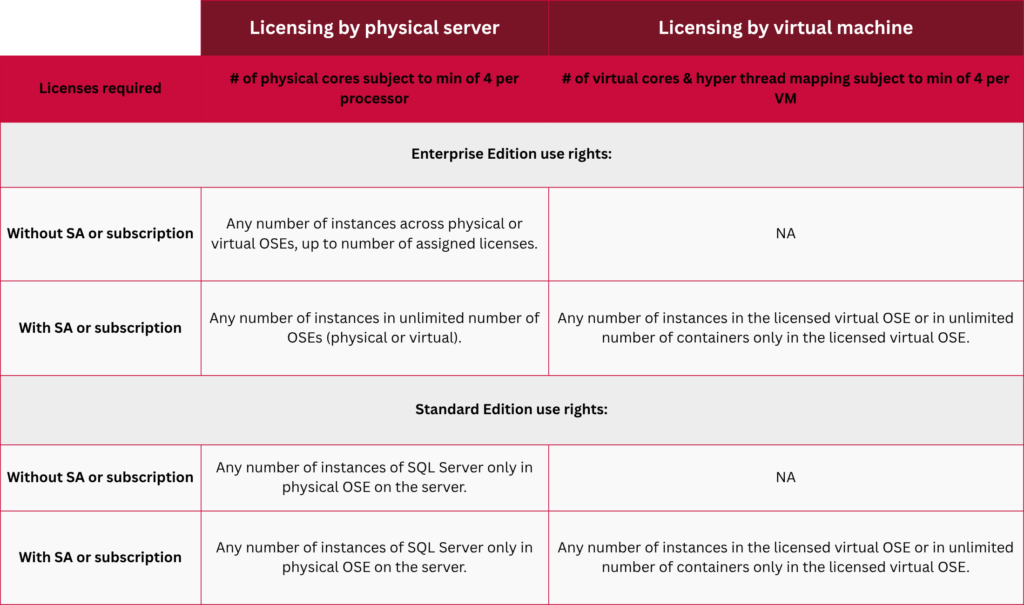
Table source www.microsoft.com/licensing/guidance/SQL
The first thing that stands out from that table is that you must have Software Assurance to licence a VM. Let’s break that down a little below.
Don’t have Microsoft Software Assurance?
You can licence all of a physical server’s processors (minimum of 4 core licences per processor) and either run SQL Server on it bare metal (Standard and Enterprise Edition); or run a number of VMs on that server limited by the number of licences (Enterprise Edition only).
If you are running a SQL virtual machine without SA, then that VM is “locked” to the physical server that has the licences. If that server is part of a server farm then you cannot allow the SQL Server VM to “float” or migrate between servers unless all of the physical servers in scope have been licensed.
So, in summary only Enterprise Edition can be run as a VM without Software Assurance and even then it isn’t moving easily.
The 90 Day Limit
Microsoft provides the option to reassign licences from one physical server to another, but those licences are locked to the server that they are attached to for a minimum of 90 days. Once moved, then the 90 day clock restarts.
With Software Assurance/Subscription
You can licence just the number of cores within the SQL Server VM.
You can also licence the physical server, and then run an unlimited number of VMs on that server, multiplexing the physical cores across multiple VMs if you want to.
You can additionally migrate the VM between VMs as needed (aka licence mobility) within certain restrictions.
Note: SA or Subscription licences provide a lot of other benefits too, such as high availability licensing benefits that reduce the total cost of ownership; “free” upgrades, etc.
There are additional concerns and complications around server farms and mobility, but the above represents a quick summary of the current position from Microsoft on basic licensing for VMs.
Could your SQL VMs be in breach of Microsoft’s 2022 rules? Request a targeted SQL Server environment review and find out.
TL;DR;
If you want to run SQL Server 2022 or 2025 in a VM and only pay for the number of cores used in the VM, then you need Software Assurance or a Subscription licence. Buying SA will also grant you a host of additional benefits that you may find useful.
If you do not have Software Assurance and want to use a VM, then you are limited to Enterprise Edition and are required to licence the physical server that hosts the VM. That VM can only run on servers that have physical licences assigned to them. Additional constraints also apply and are described in more detail on the Microsoft guidance page linked with the table above.
If you are currently running SQL Server in a VM (or planning on doing so), then it’s time to go double check how it is configured and what licence agreements you have in place for them.
Prevent penalties: SQL Server licence review & assessment services
Ensuring proper licensing for your SQL Server environment is vital to maintaining strict compliance with Microsoft regulations and prevent costly licensing shortfalls during audits. Navigating complex licensing models can be challenging, particularly when dealing with virtualised infrastructure which in selected versions require Software Assurance, hybrid environments, or planned cloud migrations.
At Xynomix, our database licensing specialists work closely with your team to review your current infrastructure and evaluate tailored licensing options aligned with your operational goals. By providing an assessment, we help you make informed decisions, optimise core allocations, and implement the most cost-effective licensing framework for your organisation.
Our SQL Server licence review delivers comprehensive insights into your existing deployments:
- Current deployment review: Identify existing licence allocations, virtualisation configurations, and active Software Assurance or Subscription benefits.
- Optimisation & cost reduction: Pinpoint over-licensed instances, redundant cores, and opportunities to streamline core licensing across virtual machines.
- Migration planning: Establish accurate licensing requirements ahead of system migrations to secure seamless transition, maintain continuous compliance, and avoid financial penalties during Microsoft audits.
This information is only intended as guidance on current Microsoft licensing (as of October 2026). A licence review with Xynomix experts helps mitigate unexpected risks and non-compliance environments, but it is in no way a substitute for a formal licence audit conducted by certified specialists. Your review should always be evaluated against your current commercial agreements and discussed directly with your licensing provider.
Planning an upgrade from an older SQL Server version?
If you are currently running legacy environments such as SQL Server 2016 or 2017, you are probably already planning an upgrade or migration roadmap. Stepping up to modern versions such as SQL Server 2025 immediately introduces these virtualisation rules and makes Software Assurance essential if you are looking for VM flexibility. Take a good look at our detailed breakdown on SQL Server 2016 End of Life and your migration options to plan your transition without unexpected licensing challenges.